A hotel may successfully issue a mobile key during a demonstration and still encounter problems when a reservation changes. A delayed update, a cancelled stay or a temporary connection failure can leave staff unsure which credential should work. Before launch, the hotel and its integration partners need to test those exceptions against agreed expected outcomes.
This guide focuses on practical acceptance testing after an integration has been configured. Supported events, credential types, offline behavior and diagnostic data vary by product. Confirm each scenario with the actual property management system (PMS), access platform and lock documentation before treating it as a requirement.
Define the test boundary
Identify the systems and versions involved, the test rooms, the credential delivery method and the people authorized to run the test. Use test reservations and test credentials in an approved environment. Agree who can change a reservation, who observes the access platform and who checks the door.
For every case, record four separate facts:
- The reservation action and when it occurred.
- The status reported by each participating system, where available.
- The credential's actual behavior at the intended door.
- The time and outcome of any correction or manual intervention.
A status shown in one dashboard is useful evidence, but it does not by itself prove that the expected door behavior occurred. Likewise, a successful unlock alone does not establish that an expired or cancelled credential was revoked.
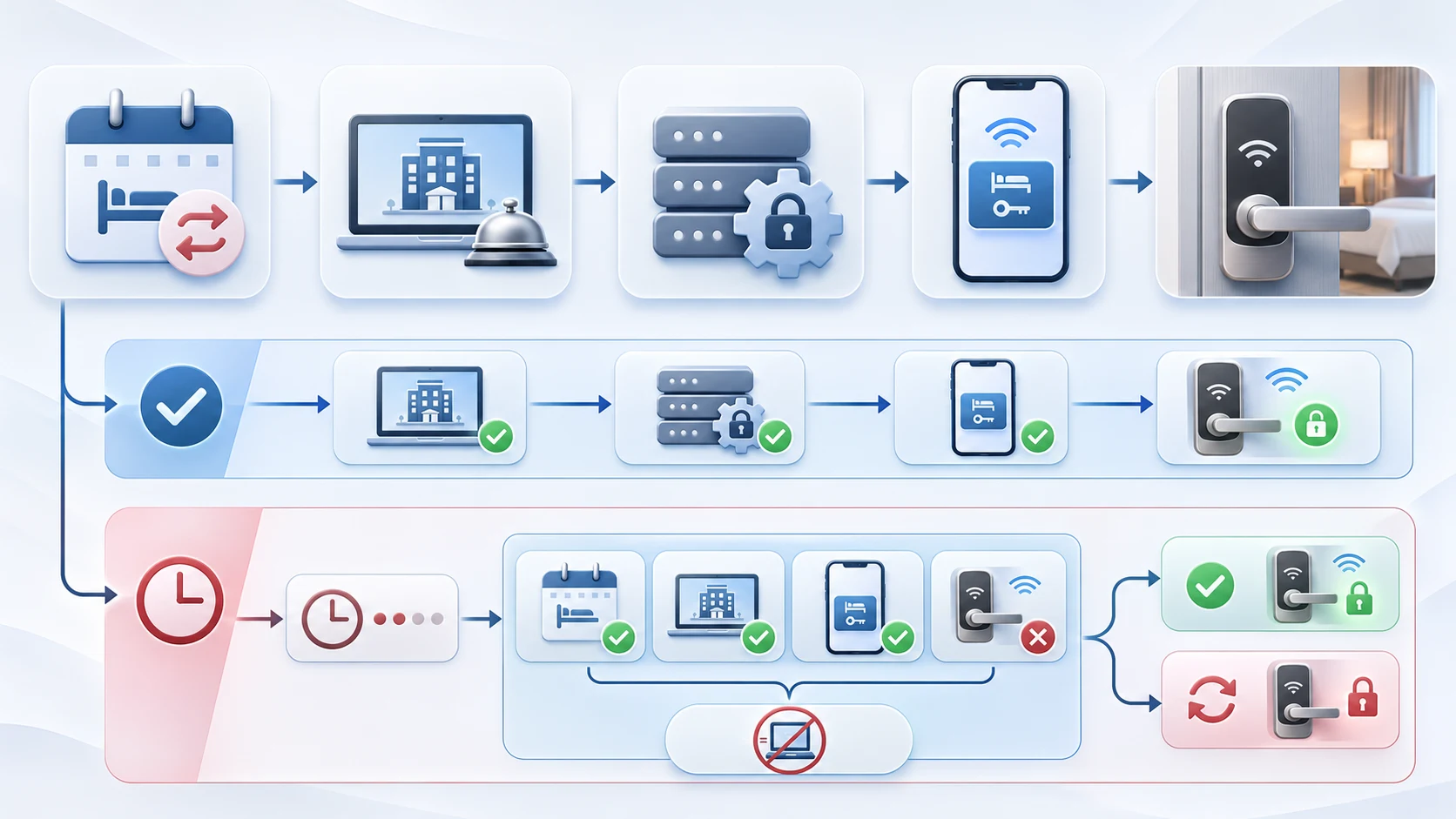
Conceptual mobile-key workflow; actual architecture, verification and offline behavior depend on the solution.
Agree on expected behavior before testing
There is no universal result for every integration. Before running a case, document the intended access window, the required response to changes, and any agreed propagation time. Establish how the team will identify the relevant reservation and credential in each system without recording unnecessary guest information.
Use the following cases as a starting point; mark a case as not applicable when the selected solution does not support the relevant feature.
| Test case | Action | Evidence to capture |
|---|---|---|
| Delayed delivery | Create a test reservation and observe credential delivery | Event times, displayed status, delivery outcome and actual door result |
| Duplicate event | In an approved test environment, repeat an event or simulate a retry supported by the integration | Number of credentials or updates created and whether the final state matches the agreed behavior |
| Changed stay | Move the arrival or departure date after a credential is issued | Old and new validity windows and results at the agreed boundary times |
| Cancellation | Cancel the reservation after issuance | Cancellation time, platform status and whether access remains possible after the agreed update window |
| Early checkout | Complete checkout before the original departure time | Actual checkout time, revised access status and door test result |
| Reissue | Replace a test credential according to the product workflow | Status and behavior of both the original and replacement credentials |
| Temporary interruption | Interrupt only a connection that the test team is authorized to control | Start and end of interruption, supported offline behavior, recovery events and final state |
Do not assume that every PMS sends the same events or that every lock can receive an immediate update. If a scenario cannot be reproduced safely, document the gap and request evidence from the responsible provider.
Test the timeline, not just the final screen
For example, take a test reservation with an already issued credential. Record the cancellation as T0, the first visible platform update as T1, and separate door tests before and after the project’s agreed update deadline. Compare the actual door results with the written policy; if T1 is unavailable, preserve that gap instead of estimating it. This is a method for recording a case, not a promise that a specific PMS or lock reports these events.
For each scenario, prepare a short timeline with a common time reference. Capture when the source event occurred, when each available system reported an update, when the guest-facing credential changed and when the door was tested. Record the time zone and any known clock differences.
Test at the points that matter for the agreed policy: before a validity window starts, while it is active, and after it ends or is revoked. A delay may be acceptable or unacceptable depending on the agreed requirement; do not invent a universal threshold. If the expected threshold has not been agreed, the test reveals an unresolved requirement rather than a pass.
Check recovery after an interruption
Use two separate test cases when the solution supports them: one in which a reservation changes while a permitted connection is down, and another in which it changes after the connection has recovered. Compare the final reservation, credential and door results against each case’s agreed expectation. If the system cannot safely queue or expose a change, record that limitation and request the relevant supplier evidence instead of simulating unsupported behavior.
An interruption test should distinguish what the solution is designed to do while disconnected from what happens after connections return. In an approved test window, observe whether queued changes are processed, whether the resulting reservation and credential states agree, and whether the door behaves as specified.
Record any manual action needed to restore service. If logs are unavailable or a component cannot report its state, note that limitation. Do not deliberately interrupt a live guest service or assume a particular offline capability without vendor confirmation.
Use a test record that supports handover
For each case, keep the test ID, system versions, test reservation reference, initial state, action, expected outcome, timestamps, observed outcomes and supporting evidence. Assign one of three results:
- Pass: observed behavior meets the agreed acceptance criteria and evidence is complete.
- Fail: observed behavior conflicts with an agreed criterion; record the owner and retest plan.
- Not yet verified: the criterion is missing, evidence is incomplete, or the scenario could not be exercised.
Include the person responsible for investigating a discrepancy and the date of the next review. Avoid placing real guest names, mobile keys or sensitive access details in a shared test report.
Decide what is ready for launch
Review failed and unverified cases with the hotel, integrator and relevant suppliers. Agree which cases must be resolved before launch, what temporary operating procedure applies, and who will repeat the test after a fix. A pilot should use an agreed number of test rooms and controlled credentials, with staff able to fall back to the property's approved access procedure.
Keep the final acceptance record with the deployed configuration. When the PMS, access platform, credential workflow or firmware changes, assess which cases need to be repeated. For earlier procurement questions, see Invisible Lock + Your PMS: 8 Questions You Must Clarify Before Integration; for broader retrofit and staff-access planning, see Hotel Smart Lock Retrofit Planning.
Source and Scope
The topic responds to hotel integration and mobile-key themes identified in the LOXE hotel technology blog. This article is an independent acceptance-testing framework. It does not claim that WAFU supports a named PMS, mobile-key workflow or specific offline behavior; verify product capabilities and interfaces before publication.
Discuss your hotel access project
Share your integration context, test scenarios and open questions. Confirm supported interfaces and credential behavior for the actual solution.